Skip to content
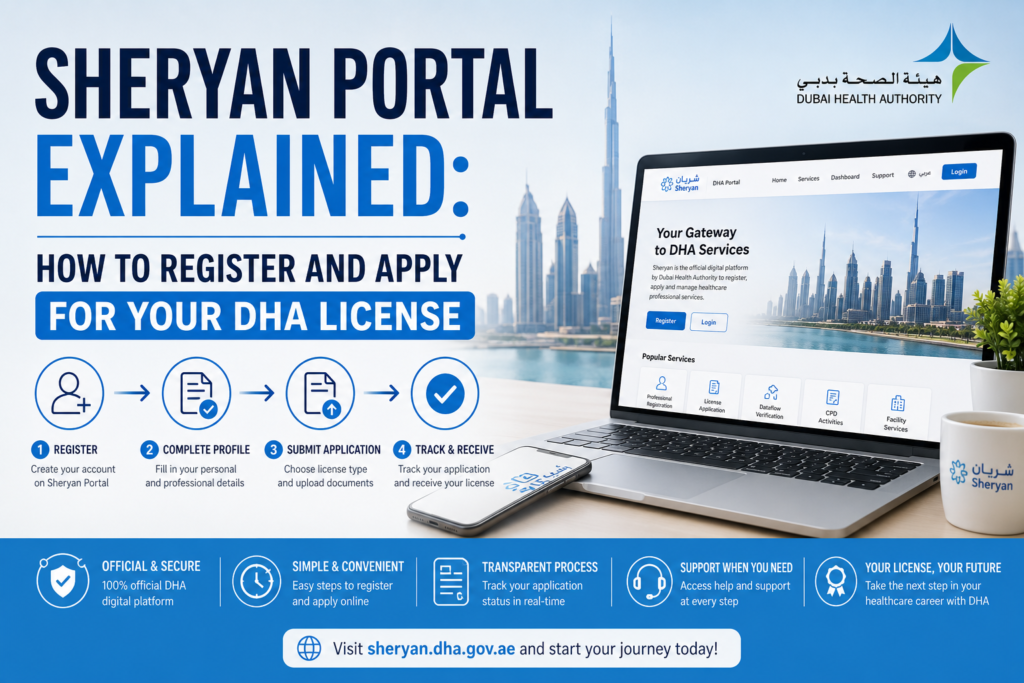
A complete walk-through of the DHA Sheryan portal — from account creation and document upload (PDF/JPEG formats, naming conventions) to application tracking and avoiding common rejection reasons.
In This Guide
- What Is the Sheryan Portal?
- How to Create Your Sheryan Account
- Understanding Application Types
- Documents Required & Upload Guidelines
- File Naming Conventions That Work
- Submitting Your Application
- How to Track Your Application Status
- Common Mistakes That Cause Delays
- Frequently Asked Questions
- Take the Next Step
What Is the Sheryan Portal?
Sheryan is the Dubai Health Authority's (DHA) official online platform for all healthcare professional licensing activities. Every step of your DHA licensing journey — from initial application and document submission to exam scheduling, license renewal, and activation — happens through Sheryan.
The portal handles the full lifecycle: initial application, assessment against DHA's Professional Qualification Requirements (PQR), issuance, and ongoing renewal. Sheryan is your digital gateway to becoming a licensed healthcare professional in Dubai.
You can access the Sheryan portal at: sheryan.dha.gov.ae or services.dha.gov.ae.
Important: Only use the official DHA Sheryan portal. Avoid third-party or fake websites. All DHA license applications and renewals are processed exclusively through Sheryan.
How to Create Your Sheryan Account
Creating a Sheryan account is the first and most critical step. Here's how to do it correctly:
Visit the Official Portal
Go to sheryan.dha.gov.ae or services.dha.gov.ae in your browser.
Click "Register" or "Sign Up"
On the homepage, select the registration option for new users.
Enter Your Personal Details
Fill in your full name, email address, mobile number, and create a password. Critical: Enter your name exactly as it appears on your passport — including any middle names.
Verify Your Account
You will receive a confirmation email or OTP to verify your account.
Pro Tip: Discrepancies between your Sheryan account name and your supporting documents are one of the most common causes of application delays. Use the exact same name format everywhere — passport, certificates, and Sheryan profile. If you have a name change (e.g., after marriage), keep proof such as an affidavit or marriage certificate.
Understanding Application Types
Sheryan supports several application types depending on your situation:
| Application Type | When to Use |
|---|---|
| New License Application | For professionals who have never held a DHA license |
| License Renewal | For renewing an existing DHA license before it expires |
| Transfer of Sponsorship | For changing employers while maintaining your DHA license |
| Additional Facility License | For practicing at multiple facilities within Dubai |
| Reactivation | For reactivating a previously held DHA license that has expired |
Documents Required & Upload Guidelines
After creating your account, you will need to upload scanned copies of your documents. Here is what you typically need:
- ✓Passport copy — clear, colour scan of the bio-data page
- ✓Passport-size photograph — recent (within 6 months), white background
- ✓Educational certificates — degree, diploma, and transcripts/mark sheets
- ✓Professional registration/license — from your home country or country of last employment
- ✓Experience certificates — with start/end dates, job title/designation, and facility details
- ✓Good Standing Certificate (GSC) — valid and recent (issued within the last 6 months)
- ✓Internship or training proof — if applicable
- ✓Updated CV
File Format Requirements
DHA has specific requirements for document uploads:
- Accepted formats: PDF or JPEG/JPG
- File size: Typically 2-5 MB per file
- Quality: Clear, colour scans — not cropped, readable, correct orientation
- PDF-A format: For license renewals, standard PDF is increasingly rejected; PDF-A (ISO 19005 compliant) is recommended
- Translations: If documents are not in English or Arabic, certified translations are required
Warning: The Sheryan portal now uses automated field validation. Anything that doesn't match the expected format, a document named incorrectly, an expired certificate, or a PDF that is not PDF-A will be flagged automatically before a human even reviews your file.
File Naming Conventions That Work
One of the most overlooked causes of application delays is incorrect file naming. Here are the best practices:
Do NOT Use:
- Generic names like
document1.pdf,scan.jpg, orIMG_20260101.pdf - Numbers only (e.g.,
1.pdf,2.jpg,3.pdf) - Special characters or spaces
DO Use:
- Descriptive file names that clearly identify the document
- Your full name in the file name for easy identification
| Document | Recommended File Name |
|---|---|
| Passport | John_Doe_Passport.pdf |
| Passport Photo | John_Doe_Photo.jpg |
| Degree Certificate | John_Doe_MBBS_Degree.pdf |
| Experience Certificate | John_Doe_Experience_Certificate.pdf |
| Good Standing Certificate | John_Doe_GSC.pdf |
| Professional License | John_Doe_Home_License.pdf |
| Internship Certificate | John_Doe_Internship.pdf |
Why this matters: DHA reviewers process hundreds of applications daily. Clear, descriptive file names help them quickly identify and verify your documents, reducing review time and preventing misplacement.
Submitting Your Application
Once your account is created and documents are prepared, follow these steps:
Log In to Your Sheryan Account
Use your email and password to access the portal.
Select the Service Type
Choose from Professional License, Exam Scheduling, Renewal, or other applicable services.
Complete the Online Application Form
Fill in detailed information about your qualifications, experience, and professional background. Complete all fields — leaving optional fields blank can sometimes trigger manual review.
Upload All Supporting Documents
Upload your documents in the correct format (PDF or JPEG) with clear, descriptive file names.
Pay the Application Fee
The portal will show the fees for your service. Pay online with a card and save the receipt.
Save Your Application Reference Number
This number is essential for tracking your application. Save it immediately.
Pro Tip: Save your progress regularly. The portal can time out during long sessions. Draft applications that are inactive for over 3 months will be automatically cleared from your account.
How to Track Your Application Status
After submission, you can check the status anytime by logging into the Sheryan portal. Here's how:
Step-by-Step Tracking
- Log in to your Sheryan account
- Navigate to the "My Applications" tab in the left sidebar
- Your application reference number and current status will be displayed
- You can see if your application is under review, approved, or requires additional documentation
Common Status Updates
| Status | What It Means |
|---|---|
| Submitted | Your application has been received and is in the queue |
| In Process | DHA is reviewing your application |
| On Hold | Additional documents are required — check your dashboard for requests |
| Completed / Approved | Your application has been approved |
| Rejected | Your application did not meet requirements — review and reapply |
DataFlow Integration
The DHA Sheryan portal syncs with DataFlow updates, so you can monitor your Primary Source Verification (PSV) progress from one place. DataFlow status updates include:
- Submitted — Your documents have been sent for verification
- In Process — DataFlow is contacting your institutions
- On Hold — Additional documents required
- Completed — Verification is complete and report is shared with DHA
Remember: Many applicants miss critical status updates simply because they are not checking the right dashboard section. Check your "My Applications" tab regularly and respond promptly to any DHA requests for additional documents.
Need help navigating the Sheryan portal?
Montgo Health Systems provides expert DHA license consultancy — from Sheryan registration and document preparation to DataFlow verification and final license issuance. Let our experts handle the process so you don't have to.
Common Mistakes That Cause Delays
Based on years of experience navigating the Sheryan portal, here are the most common reasons applications get delayed or rejected:
- Name mismatches: Your Sheryan account name, passport, and certificates must match exactly
- Unclear or blurry scans: Documents must be clear, readable, and in colour
- Incorrect file format: Use PDF or JPEG — and PDF-A for renewals
- Generic file names: Use descriptive names like
John_Doe_Passport.pdfinstead ofscan1.pdf - Expired documents: Good Standing Certificates must be issued within the last 6 months
- Incomplete applications: Fill in all fields — even optional ones
- Missing translations: Documents not in English or Arabic need certified translations
- Incorrect experience certificates: Must include letterhead, official stamp, start/end dates, and job title
- Not responding to DHA queries: Check your dashboard regularly and respond promptly
- Letting applications expire: Draft applications inactive for over 3 months are automatically cleared
Frequently Asked Questions
What is the Sheryan portal?
Sheryan is DHA's official online platform for all healthcare professional licensing activities — from initial application to license renewal.
How do I access the Sheryan portal?
Visit sheryan.dha.gov.ae or services.dha.gov.ae in your browser.
What documents do I need to upload?
You typically need: passport copy, passport-size photo, educational certificates, professional license, experience certificates, Good Standing Certificate, and internship proof.
What file formats does Sheryan accept?
PDF or JPEG/JPG formats are accepted. For renewals, PDF-A (ISO 19005 compliant) is recommended as standard PDF is increasingly rejected.
What should I name my uploaded files?
Use descriptive names like John_Doe_Passport.pdf. Avoid generic names like scan1.pdf or numbers only.
How do I track my application status?
Log in to Sheryan, go to the "My Applications" tab, and check your application status.
What happens if my application is rejected?
DHA returns one of three outcomes: Eligible, Conditionally Eligible, or Rejected. Review the rejection reason, correct the issues, and reapply.
How long does the Sheryan application process take?
The timeline varies, but typically: Sheryan submission (1-3 days), DataFlow verification (4-8 weeks), exam (2-4 weeks), and DHA review (2-4 weeks).
Can I save my application and complete it later?
Yes, you can save your progress. However, draft applications that are inactive for over 3 months will be automatically cleared from your account.
What if I don't have a required document?
Upload a justification letter explaining why the document is unavailable. However, missing critical documents may delay or reject your application.
Take the Next Step
The Sheryan portal is your gateway to practicing as a healthcare professional in Dubai. While the process is straightforward when done correctly, even small mistakes can cause significant delays — sometimes weeks or months.
Ready to start your DHA licensing journey? Montgo Health Systems provides expert DHA license consultancy — from Sheryan registration and document preparation to DataFlow verification and final license issuance. Get started today →
Quick Reference: Sheryan Portal Checklist
- ✓Create Sheryan account with exact passport name
- ✓Prepare all documents in PDF or JPEG format
- ✓Use descriptive file names (e.g., John_Doe_Passport.pdf)
- ✓Ensure documents are clear, colour scans
- ✓Complete all fields in the application form
- ✓Save your Application Reference Number
- ✓Check "My Applications" tab regularly for updates
- ✓Respond promptly to any DHA requests for additional documents
Remember: The Sheryan portal uses automated validation. Any mistake — incorrect file name, wrong format, expired certificate — will be flagged immediately. Our DHA license consultancy experts can help you avoid these pitfalls and fast-track your approval.
This article is intended for educational and informational purposes only. Licensing requirements are subject to change; please verify all information with official DHA sources or a qualified licensing consultant before beginning your application.